iCoder CPT RVU ICD10 HCPCS NDC
- 4.3
- Rating
- 10.00K
- Installs
- Free
- Price

 Analysis by App-foxy
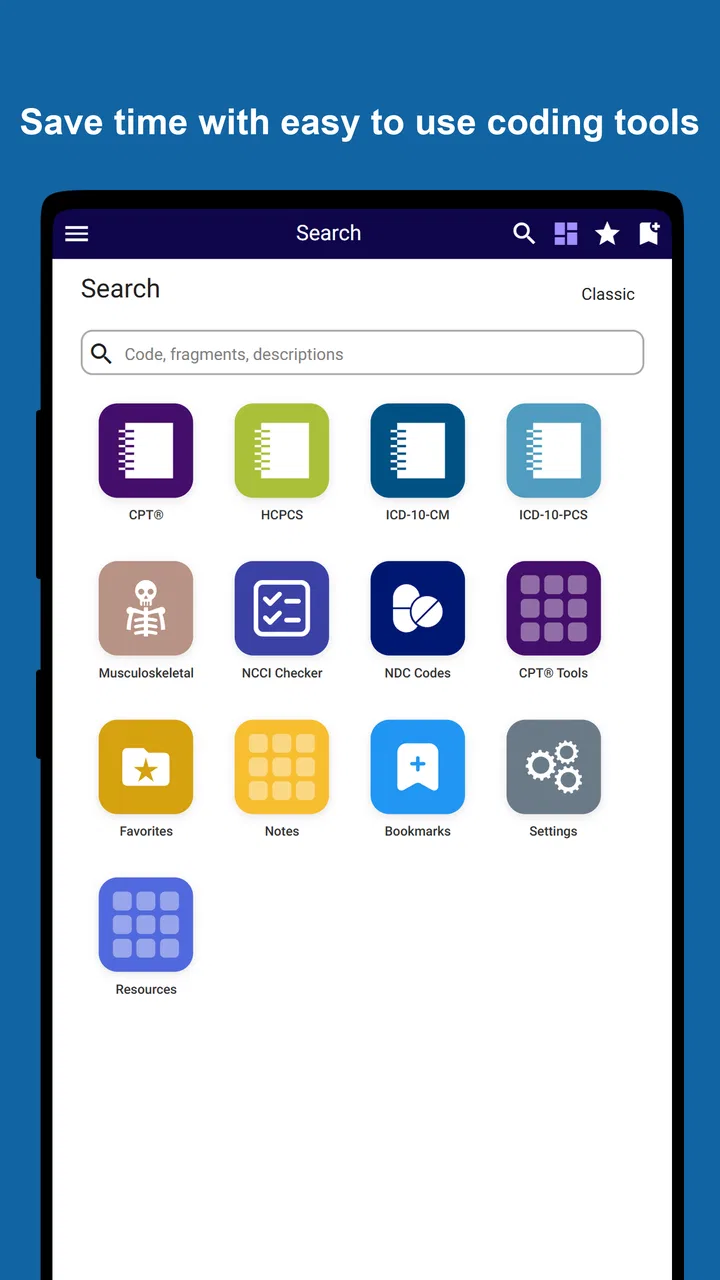
When I need a compact medical coding reference rather than a full practice-management system, I look for three things first: the breadth of the code sets, the speed of finding a useful entry, and whether the app fits the way I already work. iCoder CPT RVU ICD10 HCPCS NDC is aimed at that specific need. It is a free medical app from StarInix that brings together CPT-4, RVU, ICD-10-CM, ICD-10-PCS, HCPCS, orthopedic references, lab fees, and NDC material in one mobile destination.
That combination makes it more specialized than a general health app and less ambitious than a complete electronic health record or billing platform. In my experience, its value depends heavily on the user. A student, coder, clinician, biller, or office worker who regularly checks terminology may appreciate having several reference areas close together. Someone looking for diagnosis guidance, patient records, claim submission, or clinical decision-making will need a different kind of tool.
What I considered before relying on it
The first decision is whether you want a reference companion or an operational system. This app belongs firmly in the reference-companion category. I would use it to look up or cross-check coding-related information while studying, preparing paperwork, discussing a case with a billing colleague, or reviewing a familiar workflow away from a desktop. I would not treat it as a replacement for professional coding judgment, payer instructions, official publications, or an organization’s approved billing process.
You May Also Like

 AccuWeather: Weather Radar
AccuWeather Review: A Quick, Clear Forecast for Everyday Decisions
For everyday plans, the best forecast is the one you can understand quickly. AccuWeather makes rain timing, radar, and local conditions easy to act on, with a few trade-offs.

 Hill Climb Racing
Why Hill Climb Racing Still Turns Crashes Into One More Run
A tiny car, a bumpy hill and one more upgrade: Hill Climb Racing keeps resurfacing because its simple chaos makes every near-miss feel personal.

 AliExpress - Shopping App
AliExpress Makes Global Shopping Feel Personal, but Shoppers Bear the Risk
AliExpress turns a global marketplace into a pocket-sized discovery engine. Its reach is useful, its shopping loop compelling, and its trade-offs easy to miss.

 Lords Mobile: Kingdom Wars
Lords Mobile Is a Kingdom-Building Routine, Not a Quick Match
A case-by-case verdict on the building, battles, device demands, and social commitments that make Lords Mobile rewarding for some players and exhausting for others.

 PDF Scanner app - TapScanner
TapScanner Makes Paperwork Easier to Capture, Check, and Share
TapScanner makes scanning with a phone feel less like a rescue operation and more like a dependable step in getting work done. Its capture tools are useful, though not flawless.

 Block Blast!
 Shows How Much a Puzzle Game Can Leave Out
A quiet grid game shows why puzzle players increasingly value instant clarity, repeatable skill and low-pressure play—and where the genre still needs to catch up.
More From Our News Desk
View All News


The range of subjects is its clearest attraction. CPT-4 and HCPCS are useful when the task centers on procedures, services, or supplies. ICD-10-CM and ICD-10-PCS serve different coding contexts, so having both named in the same app can reduce the need to jump between unrelated references. RVU information adds a reimbursement-oriented angle, while orthopedic, laboratory-fee, and NDC sections make the app more relevant to specialized office work than a simple diagnosis-code browser.
I also pay attention to the practical profile. The app is free to install, is rated for Everyone, and works on Android versions from 8.0 onward. It has passed the early adoption stage with over ten thousand installs and an average rating of 4.3 from around forty ratings. Those figures suggest a small but real user base, although I would still test it against my own daily tasks before making it part of a department-wide routine.
The current version is 2.0.3, and the app was released in early January 2022. That history matters less than the actual workflow: medical references need to be checked carefully, and a familiar interface is only useful if the information can be located without wasting time. I recommend trying several representative searches instead of judging it from the list of subjects alone.
How I would test it before committing
I would begin with a short checklist drawn from real work. I would search a procedure in the CPT area, move to an ICD-10-CM diagnosis, check an HCPCS item, inspect an NDC entry, and then open one of the orthopedic or laboratory-related sections. The goal is not merely to see whether a term appears. I would note how quickly I can move from a broad term to the exact entry I need and whether the presentation is readable on my phone.
A second useful test is a “two-reference” task. For example, I might review a procedure-related code and then check the associated reimbursement-oriented information in the RVU section. This reveals whether the app helps me keep related work together or simply places several independent catalogs under one roof. That distinction affects whether it saves time in practice.
I would also test it in a quiet setting and during a realistic interruption. A medical reference that feels easy at a desk may feel less convenient when I am moving between rooms, answering a question, or checking a detail during a short break. I would pay attention to how much tapping is required, whether I can recover from a wrong search, and whether the wording is clear enough to prevent a hurried misreading.
One important habit is to record the exact context of every lookup. A code reference can help me locate a candidate, but it does not automatically decide whether that code is appropriate for a particular encounter, documentation set, payer rule, or billing situation. I would keep the app in the “research and cross-check” stage of my workflow, followed by review against the organization’s authoritative sources.
Where the broad reference mix helps
The strongest practical idea here is consolidation. If I normally open separate resources for procedure codes, diagnosis codes, supplies, drugs, and reimbursement information, a single app can reduce the mental cost of switching. That does not guarantee that every lookup will be faster, but it gives me one predictable starting point.
The mix is especially useful for people whose work crosses boundaries. A coder may need to move from a diagnosis question to a procedure question. A medical assistant may encounter a drug or supply reference while preparing information for a billing colleague. An orthopedic office may value the dedicated orthopedic material more than a general-purpose code browser would offer. A laboratory-focused worker may likewise find the lab-fee section more relevant than a broad health encyclopedia.
For learners, the app can support repetition. I can choose a small group of code families, practice locating them, and compare how different reference areas organize information. That is more useful than randomly browsing because it turns the app into a structured study aid. I would still pair that practice with course materials and official guidance, but the mobile format makes short review sessions easier to fit into a busy day.
There is also a less obvious benefit for conversations. Suppose I am discussing a documentation question with a colleague and neither of us wants to open a full desktop system immediately. A focused mobile reference can help us frame the question and identify the relevant code family before we return to the formal workflow. The app is valuable in that preparatory role even when it is not the final authority.
A realistic workday example
Imagine I work in a small orthopedic office and receive a question about a procedure, the related diagnosis wording, and whether a supply or medication reference should be checked separately. I could start with the orthopedic area to orient myself, inspect the relevant CPT-4 entry, move to ICD-10-CM for the diagnosis side, and then use HCPCS or NDC if the question involves a product rather than a service.
That sequence is where the app’s design concept makes sense. I am not expecting it to submit a claim or evaluate the entire chart. I am using it as a pocket index that keeps several related reference categories within reach. Afterward, I would verify the result through the approved coding process, especially if the answer affects reimbursement or compliance.
The same approach could work in a laboratory setting. I might use the lab-fee material to locate the relevant area, then compare it with the procedure or diagnosis context involved in the request. The useful insight is that the app supports the path between categories; it does not eliminate the need to understand how those categories relate.
Where the experience may slow me down
The breadth that attracts me can also create friction. Several code systems have similar-looking abbreviations and different purposes. On a small screen, moving between CPT-4, ICD-10-CM, ICD-10-PCS, HCPCS, RVU, and NDC requires concentration. A new user may know the term they want but not the correct section, and a quick result can feel more definitive than it really is.
I would therefore avoid treating the first matching entry as the answer. I would read the surrounding description, confirm that I am in the correct code family, and check the documentation context before passing the information into a billing workflow. This is not a criticism unique to mobile references, but the convenience of having everything together makes disciplined checking even more important.
Another trade-off is specialization. The app is useful because it focuses on coding and reimbursement-related references, but that focus means it is not the right tool for broader medical information. I would not choose it as my main resource for medication counseling, symptom triage, patient education, appointment management, or clinical records. A general medical app may be better for educational explanations, while an official coding portal or enterprise platform may be better for controlled professional work.
I would also be cautious about using it as the only resource in a changing regulatory environment. Coding work can depend on annual updates, payer-specific instructions, local policies, and documentation standards. A mobile reference can be a convenient layer in the process, but I would not let convenience replace checking the current authoritative material required by my employer or profession.
Who should choose it, and who should look elsewhere?
I see a good fit for students learning medical coding, independent coders who want a portable reference, clinicians who occasionally need to orient themselves around code families, and small practices that need a quick supplementary tool. It may also suit orthopedic or laboratory staff who benefit from the app’s subject coverage instead of using a generic code-search product.
I would recommend skipping it if your main requirement is a complete revenue-cycle workflow. The app should not be confused with software for scheduling, charting, claim transmission, denial management, audit trails, team permissions, or patient communication. If several people need synchronized work, documented approvals, and organization-wide controls, a professional platform is the better category.
I would also look elsewhere if I need extensive teaching content. A reference can show me where to look, but a student who needs detailed lessons, examples, quizzes, or step-by-step explanations may learn more from a dedicated training course. The app can support study, but I would not expect it to replace instruction.
For a large healthcare organization, the question is not simply whether the app contains useful code areas. The organization would need to consider its internal compliance process, approved sources, device policies, and support expectations. A free app can be excellent for individual convenience while still being unsuitable as the formal system of record.
Understanding the cost before switching
The free entry point makes experimentation easy, but the in-app purchase range is substantial: individual items run from about eighty dollars to around two hundred fifty dollars. I would not purchase anything immediately. First, I would identify which reference areas I genuinely use, compare the app’s workflow with my current resources, and calculate whether the time saved justifies the added expense.
This is where the cost of switching becomes more than money. I would need to learn the app’s organization, rebuild my search habits, and decide where it fits beside official references. If I already have a reliable desktop subscription or workplace system, the mobile app may be most valuable as a convenience layer rather than a replacement. Paying for access without changing a real workflow would not be a good trade.
Before spending, I would run a small trial period based on actual tasks rather than casual browsing. I would write down the searches I make during a normal week, see which ones the app handles comfortably, and mark where I still need another source. That simple record would reveal whether the purchase addresses a repeated problem or merely looks attractive because it gathers many topics together.
I would also separate “finding a code” from “making a coding decision.” If the app helps me locate terms but I still need another system for validation, policy checks, and final submission, its purchase should be judged as a reference expense. That may still be worthwhile, particularly for frequent mobile work, but it should not be evaluated as though it replaces a full professional platform.
My recommendation after weighing the alternatives
My recommendation is cautious but positive for the right audience. I would choose this app as a portable medical coding reference when I regularly move among CPT-4, RVU, ICD-10-CM, ICD-10-PCS, HCPCS, orthopedic, lab-fee, and NDC topics. Its appeal is not one spectacular feature; it is the practical decision to place several related reference areas in one mobile tool.
I would use it for preparation, study, quick orientation, and cross-checking. I would not use it as the final authority for a complex claim or as a substitute for professional review. That boundary is the key to getting value from it: let the app shorten the route to relevant information, then apply the documentation, payer, and compliance checks that the real task requires.
For someone who only needs occasional diagnosis lookups, a simpler code-search option may be easier to learn. For someone who needs patient care features, a general medical app will fit better. For a billing department that needs collaboration and controlled workflows, enterprise software is the stronger choice. But for an individual who wants several coding-related references on an Android device and is willing to verify important decisions, this is a sensible app to try.
In the end, I would judge iCoder CPT RVU ICD10 HCPCS NDC by one question: does it reduce the number of separate references I open during real work without encouraging me to skip verification? If the answer is yes, its focused coverage and free installation make it a useful companion. If my needs extend beyond lookup and orientation, I would keep it as a secondary reference or choose a more complete professional solution instead.
FAQs for iCoder CPT RVU ICD10 HCPCS NDC
01What is iCoder CPT RVU ICD10 HCPCS NDC used for?
iCoder CPT RVU ICD10 HCPCS NDC is a medical coding reference app designed to help healthcare professionals, medical billers, coders, students, and clinical staff look up common coding systems in one place. It typically brings together CPT procedure codes, ICD-10 diagnosis codes, HCPCS codes, RVU information, and NDC drug identifiers, making it useful for quick reference during coding, billing, documentation, and study sessions.
02Does iCoder include CPT, ICD-10, HCPCS, RVU, and NDC code information?
The app is built around these major medical coding and reimbursement references, including CPT, ICD-10, HCPCS, Relative Value Units, and National Drug Codes. However, the exact database coverage, code-year edition, descriptions, and available search tools may vary by version. Before relying on the app for professional work, users should check its listing and in-app information to confirm whether the current update includes the specific code sets and terminology they need.
03Is iCoder CPT RVU ICD10 HCPCS NDC suitable for professional medical billing?
It can be a convenient supporting reference for coders, billers, healthcare providers, and students who need fast access to code descriptions and related information. Nevertheless, it should not automatically replace official coding manuals, payer policies, CMS guidance, facility rules, or certified coding advice. Coding requirements change regularly, and users should verify important claims, reimbursement decisions, and compliance-sensitive entries against authoritative and current sources.
04Does the app work offline, and does it require an internet connection?
Offline availability depends on how the installed version stores its coding databases and whether certain features are delivered online. Some reference functions may work without an active connection after installation, while updates, advertisements, external links, or supplemental content may require internet access. If offline coding is important to you, review the app description, permissions, and update notes before downloading, especially when working in hospitals or areas with limited connectivity.
05Is iCoder CPT RVU ICD10 HCPCS NDC free to download and use?
The download and basic access conditions can differ between Android and iOS versions, regions, and app updates. Some editions may be free with advertisements, while other features or versions could involve purchases or different limitations. Users should check the current store listing for pricing, in-app purchases, supported devices, privacy details, and the latest update date before installing, since these terms can change after publication.
Pros
- Combines CPT
- RVU
- ICD-10
- HCPCS
- and NDC references in one app.
- Useful for quick code lookups during billing
- documentation
- or clinical workflows.
- Helps compare procedure values with RVU information at the point of reference.
- Offline access may be convenient in locations with limited internet connectivity.
- Search-based navigation can reduce the time spent browsing large coding lists.
Cons
- Medical coding data may require updates to reflect the latest annual code changes.
- Some entries or reference details may be limited compared with paid coding platforms.
- The interface can feel dense for users unfamiliar with coding terminology.
- RVU figures may need verification against payer-specific rules and current policies.
- It is a reference tool
- not a substitute for official coding guidance or training.

iCoder CPT RVU ICD10 HCPCS NDC
Gallery